
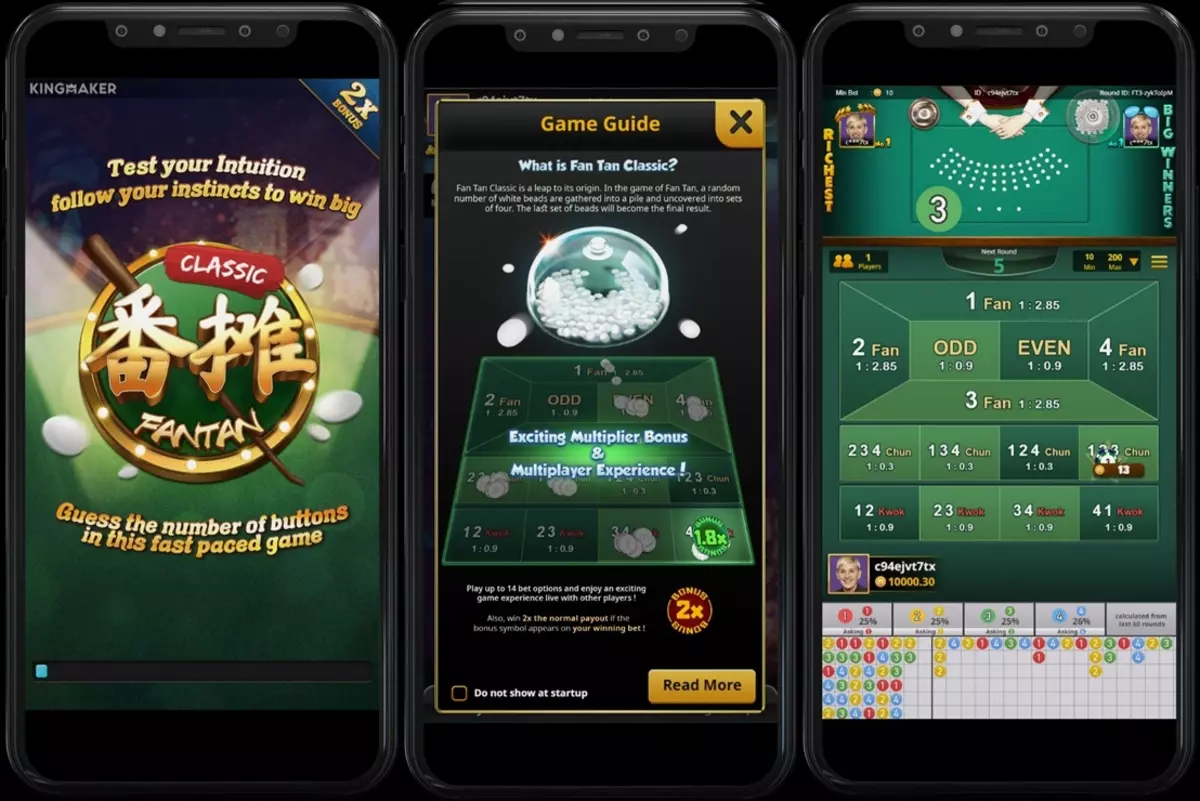
Yes! You can play Fan-Tan on mobile at Panalobet through our browser-based platform, which requires no app download while delivering full functionality on iOS and Android devices . Our mobile-optimised website provides the most seamless experience with instant access, no storage requirements, and full feature availability . Filipino players can enjoy live dealer Fan-Tan with professional croupiers, HD streaming, and all betting options – including Fan, Nim, Kwok, and Nga – all from their smartphone or tablet .
Mobile Fan-Tan Options at Panalobet
Browser-Based Platform (Recommended)
| Feature | Benefit |
|---|---|
| No Download | Instant access – play immediately |
| No Storage | Zero space required on your device |
| Full Features | Same as desktop version |
| Updates | Automatic – always latest version |
| Compatibility | Works on all devices (iOS, Android, etc.) |
| Security | SSL encryption protecting all transactions |
How to Access Fan-Tan on Mobile
| Step | Action |
|---|---|
| 1 | Open browser (Chrome, Safari, or any mobile browser) |
| 2 | Visit Panalobet at https://panalobay.com/ |
| 3 | Log in to your existing account or sign up |
| 4 | Navigate to Live Casino section |
| 5 | Select Fan-Tan from available games |
| 6 | Choose table based on your preferred limits |
| 7 | Place bets and enjoy the game! |
Mobile Fan-Tan Experience at Panalobet
Touch-Optimised Controls
| Action | Mobile Control |
|---|---|
| Place Bets | Tap directly on betting areas (Fan, Nim, Kwok, Nga) |
| Adjust Bet Amount | Tap chip denominations to select value |
| Clear Bets | Tap clear button to remove all bets |
| Repeat Bet | Tap repeat button to place same bets as previous round |
| Chat with Dealer | Tap chat icon to interact |
| View Roadmap | Pinch to zoom or tap to expand |
| Game History | Swipe to view past results |
Streaming Quality Options
| Connection Type | Recommended Quality | Experience |
|---|---|---|
| WiFi | HD (1080p) | Best experience – crystal clear video |
| 4G/5G | HD (720p) | Smooth playback, minimal buffering |
| 3G | Standard (480p) | Playable, may have slight delays |
| Poor signal | Low bandwidth mode | Automatic adjustment for stable connection |
Mobile Fan-Tan vs Desktop Comparison
| Feature | Mobile Browser | Desktop |
|---|---|---|
| Game Selection | Full – all Fan-Tan tables available | Full |
| Bet Types | Fan, Nim, Kwok, Nga – all available | All available |
| Live Dealer | Yes – HD streaming with real dealers | Yes |
| Roadmap Display | Optimized touch-friendly view | Standard view |
| Chat Function | Yes – fully integrated | Yes |
| Deposits | Yes – GCash, PayMaya, bank transfers | Yes |
| Withdrawals | Yes – process anytime | Yes |
| Account Management | Full access | Full access |
Why Browser-Based Is Better Than Dedicated Apps
Advantages Over Native Apps
| Factor | Browser-Based (Panalobet) | Dedicated App |
|---|---|---|
| Storage Space | 0MB required | 100-200MB required |
| Installation | None – instant access | Download + installation needed |
| Updates | Automatic – always current | Manual updates required |
| Compatibility | All devices with browser | Limited by OS version |
| Security | Browser security + SSL | App permissions required |
| Access | No approval needed | May be removed from app stores |
| Battery Usage | Optimized | Often higher consumption |
Common App Limitations
| Limitation | Why It Matters |
|---|---|
| App Store Restrictions | Casino apps often removed from Google Play/App Store |
| Storage Space | Takes up valuable device memory |
| Update Delays | App updates require approval, causing delays |
| Battery Drain | Native apps often consume more power |
| Background Data | May use data even when not actively playing |
Mobile Fan-Tan Features at Panalobet
Live Dealer Experience on Mobile
| Feature | Mobile Implementation |
|---|---|
| Video Quality | Adaptive HD streaming – adjusts to connection |
| Dealer View | Clear, zoomable with pinch gesture |
| Equipment Visibility | Real buttons, wand, and cup clearly visible |
| Roadmap Display | Touch-optimized, easy to read |
| Audio Quality | Clear sound with volume control |
| Multiple Camera Angles | Switch views with simple tap |
Betting Interface on Mobile
| Feature | Mobile Experience |
|---|---|
| Bet Placement | One-tap betting on all options |
| Chip Selection | Easy denomination picker with visual chips |
| Bet Removal | Simple clear or undo function |
| Quick Bets | Save favourite bet combinations |
| Auto Bet | Available for consistent play |
| Bet Limits | Clearly displayed for each table |
Fan-Tan Betting Options on Mobile
| Bet Type | Mobile Betting Experience |
|---|---|
| Fan (1-4) | Tap numbered squares – simple and clear |
| Nim | Tap combination areas – visual indicator of win/push |
| Kwok | Tap pair areas – highlighted when selected |
| Nga | Tap triple areas – clear coverage display |
Tips for Optimal Mobile Fan-Tan Play
Before You Play
| Tip | Benefit |
|---|---|
| Use WiFi when possible | Best streaming quality, no data concerns |
| Close background apps | Free up device resources for smoother play |
| Charge your device | Avoid interruptions mid-game |
| Clear browser cache | Prevent slowdown from accumulated data |
| Update browser | Latest version ensures best compatibility |
During Gameplay
| Tip | Benefit |
|---|---|
| Use landscape mode | Better view of table and betting areas |
| Enable Do Not Disturb | Avoid interruptions during live dealer |
| Keep strategy chart handy | Screenshot basic strategy for reference |
| Take breaks | Prevent fatigue during long sessions |
| Check connection | Ensure stable internet for live dealer |
Data Usage Information
| Activity | Data Usage (Approximate) |
|---|---|
| 1 hour live dealer (HD) | 150-300MB |
| 1 hour live dealer (Standard) | 50-100MB |
| Betting only (no video) | Minimal – under 10MB |
| Per round | 2-5MB (HD) |
Mobile Payment Methods at Panalobet
Filipino-Friendly Options
| Method | Mobile Experience | Processing Time |
|---|---|---|
| GCash | Seamless integration – tap to pay | Instant |
| PayMaya | Easy mobile wallet payments | Instant |
| Bank Transfer | Mobile banking app integration | 1-3 banking days |
| Credit/Debit Card | Secure mobile checkout | Instant |
Mobile Deposit Steps
| Step | Action |
|---|---|
| 1 | Log in to Panalobet on your mobile device |
| 2 | Tap “Deposit” in the main menu |
| 3 | Select GCash or PayMaya from options |
| 4 | Enter deposit amount (minimum ₱100) |
| 5 | Confirm via mobile wallet app |
| 6 | Funds available instantly – start playing Fan-Tan |
Mobile Withdrawal Steps
| Step | Action |
|---|---|
| 1 | Navigate to Withdrawal section |
| 2 | Select withdrawal method (same as deposit preferred) |
| 3 | Enter amount (minimum ₱500 for e-wallets) |
| 4 | Confirm request |
| 5 | Processing – typically 24-48 hours for e-wallets |
Mobile Security for Fan-Tan Players
How Panalobet Protects You
| Security Feature | Description |
|---|---|
| SSL Encryption | All data encrypted during transmission |
| Secure Login | Password protection with optional biometrics |
| KYC Verification | Prevents identity theft |
| Fraud Monitoring | Suspicious activity alerts |
| Session Timeout | Automatic logout after inactivity |
| Privacy Policy | Your data never sold to third parties |
Tips for Secure Mobile Play
| Tip | Why It Matters |
|---|---|
| Use device passcode | Prevents unauthorized access |
| Never share credentials | Keep login details private |
| Log out after playing | Especially on shared devices |
| Use official browser | Avoid third-party browsers with unknown security |
| Enable biometric login | Fingerprint or Face ID for added security |
| Check URL | Always verify https://panalobay.com/ |
Mobile Fan-Tan for Beginners
Getting Started on Mobile
| Step | Action |
|---|---|
| 1 | Visit Panalobet on mobile browser |
| 2 | Create account – free registration |
| 3 | Claim free 34P bonus – no deposit needed |
| 4 | Try demo mode – practice without risk |
| 5 | Watch a few rounds before betting |
| 6 | Start with Kwok bets – 50% winning chance |
| 7 | Set limits – deposit and loss limits |
Practice Tips
- Use demo mode to learn betting options
- Watch live dealer rounds without betting
- Study the roadmap to understand patterns
- Start with minimum bets when playing real money
- Track your results to identify what works
Frequently Asked Questions About Mobile Fan-Tan
Do I need to download an app to play Fan-Tan?
No – Panalobet is browser-based . Simply visit our website on your mobile device and start playing instantly .
Is mobile Fan-Tan the same as desktop?
Absolutely. All features, betting options (Fan, Nim, Kwok, Nga), live dealer quality, and account functions are identical .
What devices are supported?
All modern smartphones and tablets running iOS (iPhone/iPad), Android, or other mobile operating systems .
Can I deposit using GCash on mobile?
Yes! GCash and PayMaya are fully integrated into our mobile platform for instant deposits .
Is mobile streaming HD quality?
Yes – adaptive streaming provides HD quality on good connections; automatically adjusts for slower connections .
How much data does mobile Fan-Tan use?
Approximately 150-300MB per hour in HD; less in standard quality (50-100MB) .
Can I chat with the dealer on mobile?
Yes! The chat function is fully available on mobile devices – tap the chat icon to interact .
Is mobile Fan-Tan secure?
Yes – Panalobet uses SSL encryption protecting all transactions and personal data on mobile .
What if my connection drops during a game?
The game will pause and reconnect automatically. Your bets are protected and results are not affected .
Conclusion
Fan-Tan mobile play at Panalobet offers Filipino players the perfect combination of convenience, authenticity, and excitement. Our browser-based platform delivers the complete live dealer experience with professional croupiers, real equipment, HD streaming, and all betting options – Fan, Nim, Kwok, and Nga – directly on your smartphone or tablet.
